




CalenGoo's permissions
CalenGoo uses certain Android permissions to be able to access the Android calendar, your contacts (to display birthdays) and other things. You can find the used permissions under the "Permissions" tab in the Google Play Store. And you can find an official explanation what these permissions do on the Android website here:http://developer.android.com/reference/android/Manifest.permission.html
https://developer.android.com/guide/topics/permissions/overview
With current Android versions (from Android 6), the permissions are only queried when the app is running. I.e. it doesn't matter which permissions are displayed in the Google Play Store. These are only the permissions that the app can theoretically query. The decisive factor is what permissions the app asks for while it is running.
Permissions
Android permissions are a security feature of Android. An app can only use certain system functions if it requests the permission to use that function. Android has a number of permissions for this purpose. Here you can see which permissions CalenGoo requires to use which functions.
Here is an example:
If you tap on "GPS search" in the "Settings > Weather" screen in CalenGoo, then Android will ask you if you would like to allow CalenGoo to access your GPS position:
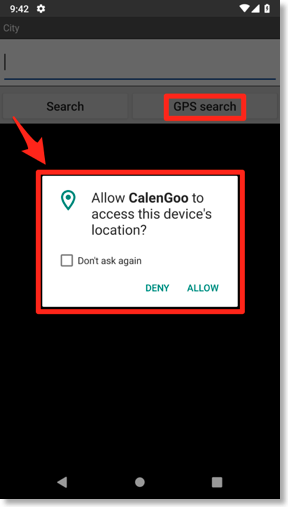
You can then freely decide whether you want to allow the app access or not. Of course the GPS search only works if you allow access, but you can also simply enter the name of your city yourself, then you don't need the GPS search and don't need to grant access accordingly.
In the "Settings" App you can see which permissions you have given CalenGoo under "Apps > CalenGoo > App permissions":
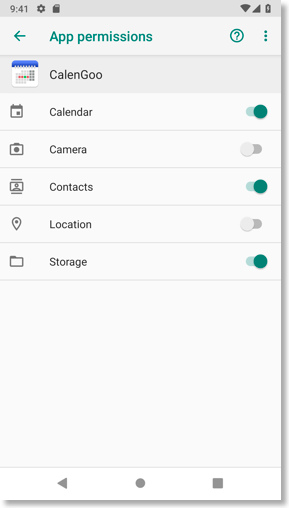
There it is also possible to deactivate permissions later.
CalenGoo has been using the same permissions since 2011. In January 2019 even one permission was removed. However, in January 2019 the possibility was added to query permissions for location and camera, but only on Android versions where you are asked for them at runtime, so that you do not have to grant these permissions to CalenGoo if you do not use the corresponding functions. As a result, Google Play has been able to automatically install updates since 2011 without asking for additional permissions, because no additional permissions had to be granted.
If you tap on "GPS search" in the "Settings > Weather" screen in CalenGoo, then Android will ask you if you would like to allow CalenGoo to access your GPS position:
You can then freely decide whether you want to allow the app access or not. Of course the GPS search only works if you allow access, but you can also simply enter the name of your city yourself, then you don't need the GPS search and don't need to grant access accordingly.
In the "Settings" App you can see which permissions you have given CalenGoo under "Apps > CalenGoo > App permissions":
There it is also possible to deactivate permissions later.
CalenGoo has been using the same permissions since 2011. In January 2019 even one permission was removed. However, in January 2019 the possibility was added to query permissions for location and camera, but only on Android versions where you are asked for them at runtime, so that you do not have to grant these permissions to CalenGoo if you do not use the corresponding functions. As a result, Google Play has been able to automatically install updates since 2011 without asking for additional permissions, because no additional permissions had to be granted.
- android.permission.INTERNET:
To be able to sync directly with Google Calendar and Google Tasks and to download icons for events, CalenGoo needs to access the Internet. - android.permission.READ_CONTACTS:
To display birthdays of your contacts and to link events to contacts, CalenGoo needs this permission. - android.permission.READ_CALENDAR and android.permission.WRITE_CALENDAR:
CalenGoo can also sync with the Android calendar. Therefore it needs to be able to read from and write to it. This includes adding attendees to events. Attendees can get an invitation email from Google Calendar when they have been added to an event.
This also generates the warning "read calendar events plus confidential information add or modify calendar events and send email to guests without owners' knowledge" when the app is installed: CalenGoo can modify events in your Android calendar. And it can add attendees to these events. When the event is synced with Google Calendar, Google Calendar automatically sends invitation emails to these attendees. This way the attendees know that they were invited to an event and can respond with "Yes", "Maybe" or "No". It works in the same way as if you add attendees to events on http://calendar.google.com .
Now back to the warning in the permission: Theoretically CalenGoo could create an event and add attendees to it without your knowledge. Then these attendees would get an invitation email "without your knowledge or permission". That's what the warning is about. But CalenGoo certainly doesn't create any events by itself without your knowledge. And it certainly also doesn't add attendees by itself. It is just a theoretical warning. - android.permission.WRITE_EXTERNAL_STORAGE:
CalenGoo can write backups to your SD card and it can also save its database on your SD card instead of in the internal memory to save space in the internal memory. - android.permission.GET_ACCOUNTS and android.permission.READ_SYNC_SETTINGS:
This is used to trigger a sync for all available accounts, i.e. to sync your Android calendar with Google Calendar and other systems. - android.permission.VIBRATE:
To vibrate the phone when a reminder is displayed. - android.permission.RECEIVE_BOOT_COMPLETED:
To start CalenGoo after your phone has been booted so that it can display your reminders. - android.permission.ACCESS_WIFI_STATE:
To support the function "Sync on Wi-Fi connect". This way CalenGoo can check if a Wi-Fi connection was established and then start the sync. - com.android.vending.CHECK_LICENSE:
To check if you have a valid license for CalenGoo in Google Play. - (dynamic only, see below): android.permission.ACCESS_NOTIFICATION_POLICY:
For the "Silent during events" and "Silent during the night" functions. - Location: (dynamic only, see below): android.permission.ACCESS_COARSE_LOCATION und android.permission.ACCESS_FINE_LOCATION:
To make it easier under "Settings > Weather" to select the correct city. - Camera: (dynamic only, see below): android.permission.CAMERA:
To view a live preview when scanning a QR code. - (dynamic only, see below): android.permission.USE_FINGERPRINT:
To protect CalenGoo with a fingerprint check, can be turned on under "Settings > Display and Use > General > Secure the app with a fingerprint check". CalenGoo just calls an Android function to let it check your fingerprint. It cannot access any fingerprint data.
"dynamic only" means that this permission is only used on devices with Android 6 or newer where the permission is only queried at runtime. I.e. after the installation of the app the app has no access to these permissions. Only when they are needed the app asks for them and only then you have to decide if you want to give the app the permission.