




CalenGoo’s menu
To open CalenGoo’s menu just tap the button with the three dots in the upper right corner of the screen: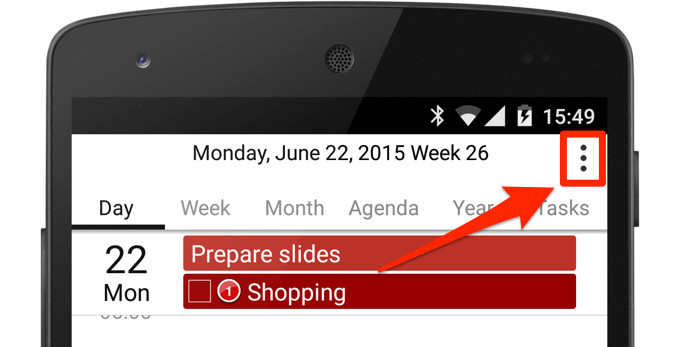
If the button isn’t there, then you have probably turned it off. To turn it on again do a swipe gesture with three fingers down from the middle of the screen. Then set "Settings > Display and Use > General > Menu button" to "Right".
Another option is to turn "Settings > Display and Use > General > Show toolbar" on to get a menu button in the lower right corner:
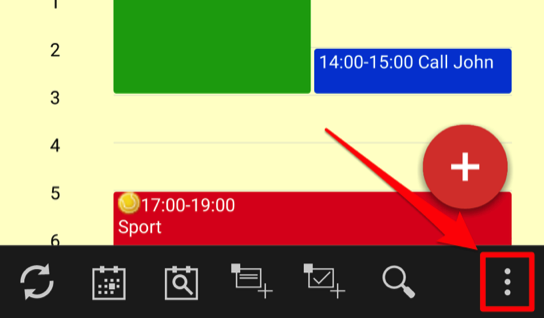
The menu button
In Android 2.x and previous versions there was a hardware button to open the menu. Often on current phones you can e.g. long press the "running apps" button (the rectangle) to open the menu. So this section is mainly about Android 2.x devices (which CalenGoo still supports).To access CalenGoo’s menu, you have to tap the menu button of your phone. On Android 2.x devices, the menu button is a hardware button. Your phone should have four buttons: “Back”, “Menu”, “Search”, “Home”:
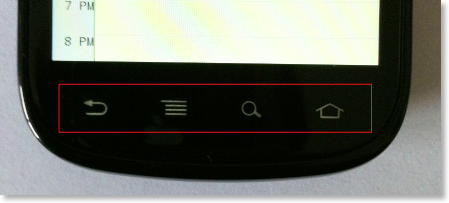
The order of the buttons may be different on your phone. To open CalenGoo’s menu just tap the “Menu” button.
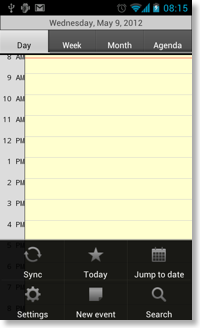
Android 4.0 devices have no hardware buttons. Instead they have a menu button on the screen, a button with three dots:

Just tap it to open CalenGoo’s menu.
Exceptions
Many new devices don’t have this three-dots menu button any more (e.g. new HTC and Samsung devices). Instead you have to press and hold the “Recent apps” button to open the menu:
On the HTC One SV you even have to configure the menu button first. Please see "Can't find the menu button" on page 32 here in the User Guide of the HTC One SV:
https://support.htc.com/@api/deki/files/101848/HTC_One_SV_LTE_User_Guide.pdf
On the HTC One X you also have to configure the menu button first. Please see "Can't find the menu button" on page 32 here in the User Guide of the HTC One X:
https://support.htc.com/@api/deki/files/101848/HTC_One_X_LTE_User_Guide.pdf
On the HTC One Mini you also have to configure the menu button first. Please see "Can't find the menu button" on page 32 here in the User Guide of the HTC One Mini:
https://support.htc.com/@api/deki/files/101848/HTC_One_Mini_LTE_User_Guide.pdf